Structure101 v6 introduces the following main enhancements:
- Workspace (introduced in v5) now runs as a stand-alone component - it comprises a super-set of the viewers, lists etc. that were previously embedded in the IDE
- New lightweight IDE/editor plugins (called Connectors) now support navigation between source editors and the Structure Map in Workspace
- A new single-page web application (called the Dashboard) supports the tracking of the new (v5) Key Measures
- Structure101 project repositories have been simplified. They now just store snapshots of projects, and no longer also serve as the "source" of project artifacts (like Actions and Specs) for Studio and Build. This means that repository snapshots are always published from a local project file, not from a repository projects.
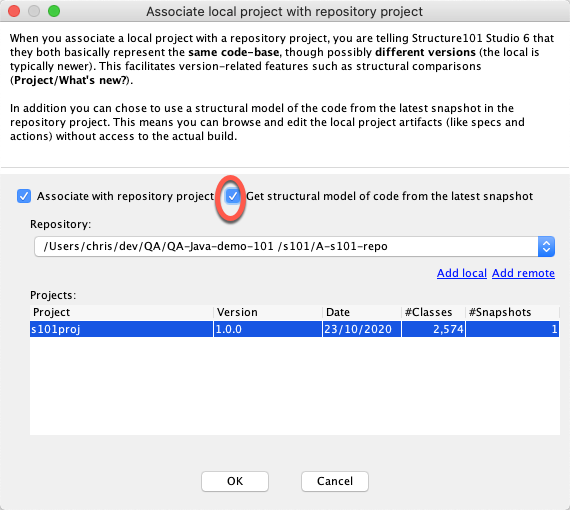
- It is now possible to open a local project file in Studio, but use the data about your project source code that has been published to a repository snapshot. This means you can maintain the architecture of projects for which you don't have easy access to the build environment.
These enhancements are outlined below.
Introducing Workspace standalone 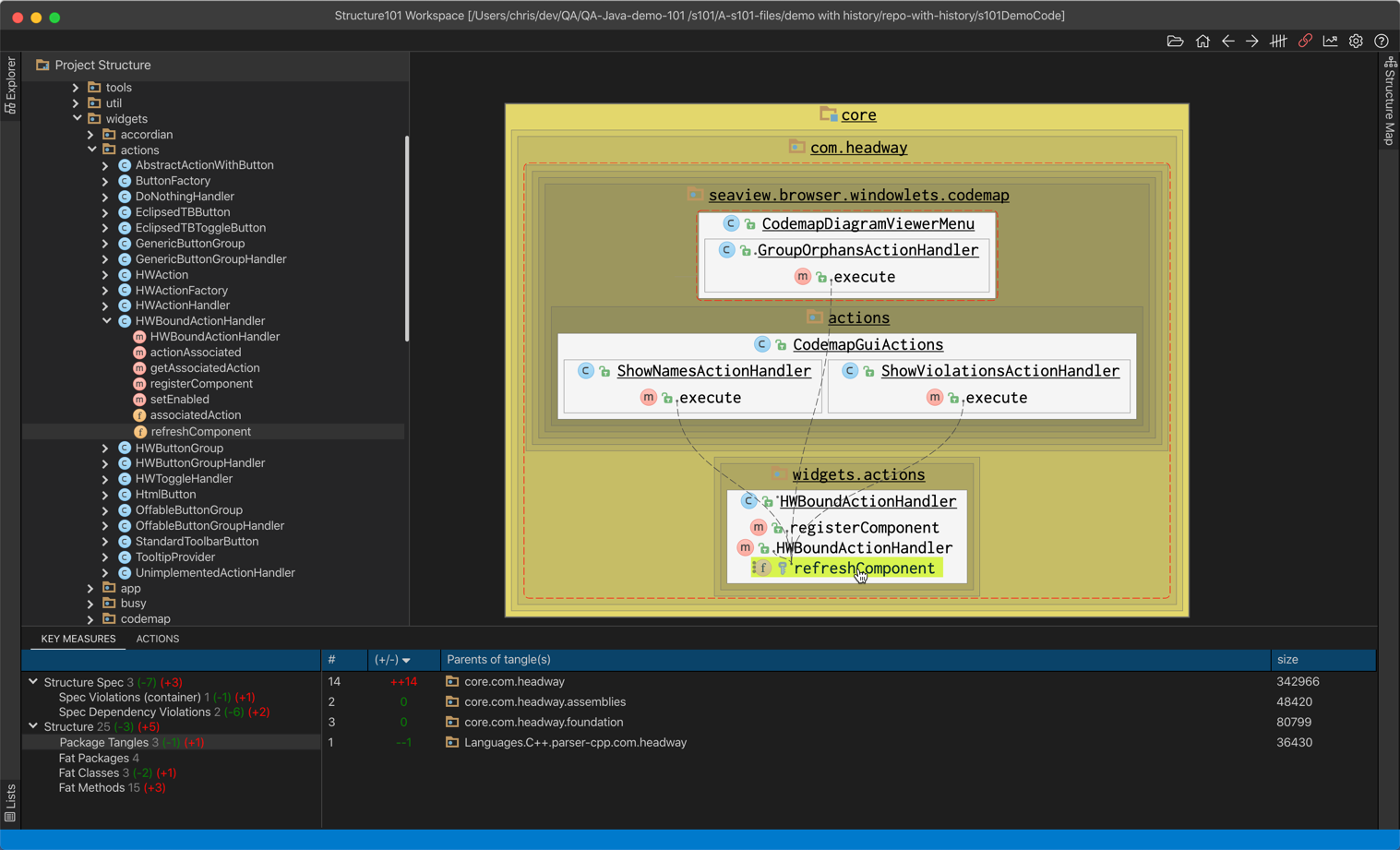
Structure101 v5 introduced a new in-IDE plugin component called Workspace. This was available for Java only.
In v6 we have moved the v5 Workspace into a separate desktop application and made it available for all supported languages, with source navigation supported via a much lighter IDE plugin.
For v5 Workspace users, this configuration removes the startup impact on the development environment, while giving total control over when and where (e.g. separate monitor) Workspace is run.
Workspace retains the same basic features as in v5, but there are some additions:
- The problem lists provide more detailed support for the Key Measures that were introduced in v5. Key Measures follow the same concepts of Fat, Tangles, and Spec Violations, but are presented as line-items rather than derived measures (XS), and so are more suitable for tracking and repair.
- You can still navigate between the Structure Map visualization and source code by way of an optional light-weight "connector" IDE/editor plugin. However Workspace can also work without the full development.
- Workspace can now directly open the *.hsp files that are created and saved by Studio.
- There is now no "lightweight" Structure Spec Editor as in v5 - Specs must now be created with Studio and saved to a .hsp and/or published to a snapshot for application within Workspace.
- Workspace can now also open a snapshot that has been published to a Structure101 repository, allowing the easy viewing of the code as it was at a particular build, with detailed lists of problems from which you can navigate to the specific items in the Structure Map visualization.
- Finally, when you have opened a snapshot in Workspace, you can navigate directly to the new Dashboard web application which lets you view how your project structure has evolved over time.
IDE Structure101 Connector
This is a plugin that you can install within supported IDE/editors, which provides navigation between source code and the Workspace Structure Map.
It also extracts high fidelity information about the IDE project structure to Studio, Build, and Workspace.
Please inquire to get an up-to-date list of supported editors, and request support for specific editors.
Introducing Dashboard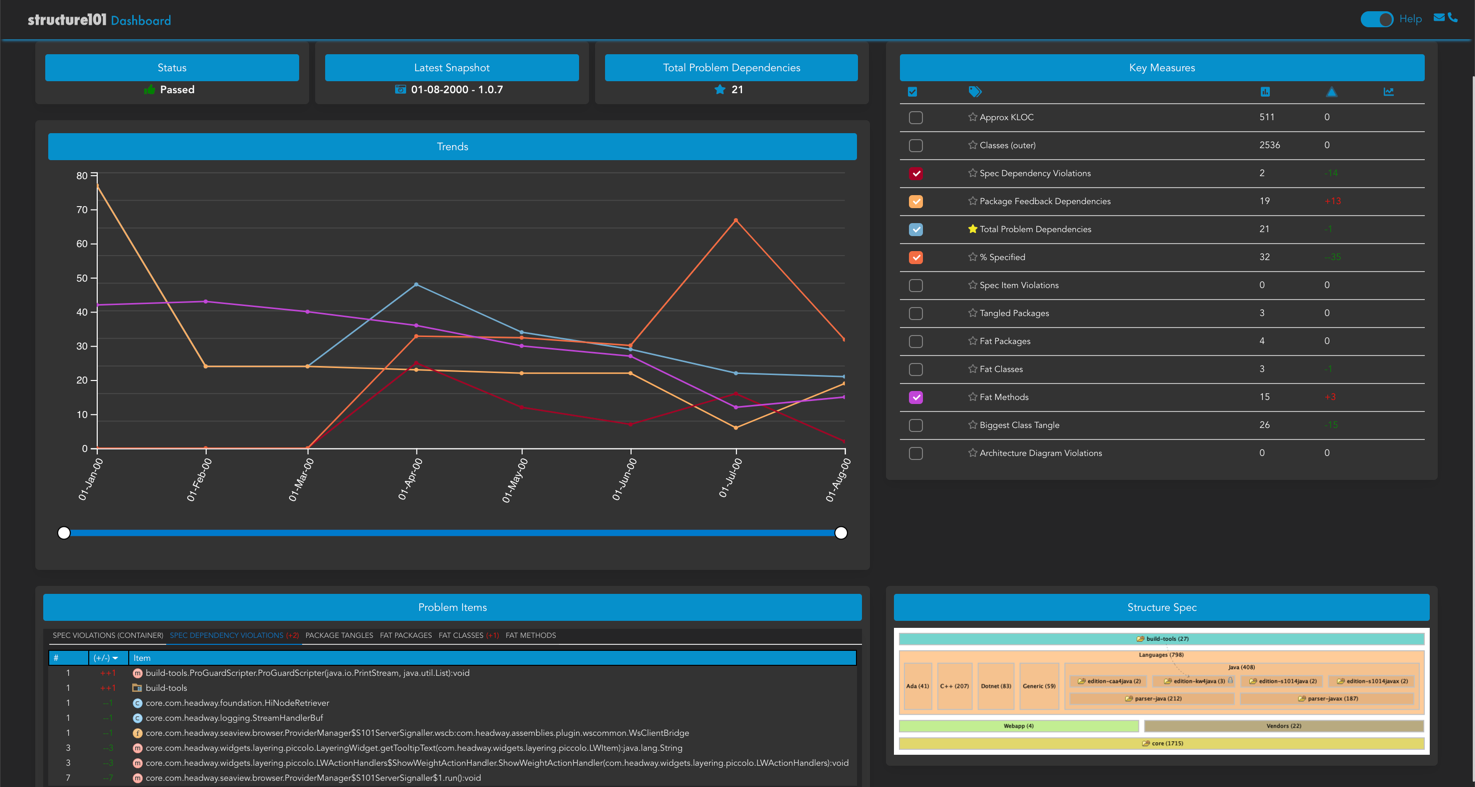
The Dashboard surfaces data about the snapshots in a repository project in a new 1-page web application that you view in your web browser.
This emphases the new Key Measures (rather than earlier XS measures). It replaces the previous "Webapp".
Within the Dashboard you can now chart how selected size and problem metrics have changed over time, and which items have newly become problems in the last build. You can also see list of specific items that violate each problem category.
For convenience, the dashboard can be opened from a button within Workspace. It can also be added to a web server so that it can be browsed by URL without needing access to the Structure101 repository on the local filesystem.
Streamlined Repository
Structure101 Repositories have been simplified to clarify the workflow. They now only retain snapshots for each project they contain. It is no longer possible to save changes to e.g. Actions Lists and Specs that you make in Studio to the repository. You can only publish a snapshot of a Local Project to the repository.
In essence this change means that your local project file (*.hsp) is always the primary source of Structure101 project artifacts. To change Action Lists, Specs, etc. you must do this in a local project file. These are generally shared via your version control repository along side the source code. Structure101 Build can then use the Local Project (*.hsp) to perform the specified checks (against the new build), and to "publish" a copy of the artifacts, check results, and structural data to a snapshot in the repository. You can also publish a snapshot directly from Studio.
Project snapshots can be opened in Studio, Workspace, and Dashboard.
The Structure101 repository data has been extended to include information and lists regarding the Key Measures.
There is a utility available that you can run over a v4/5 repository in order to upgrade the data it contains, to make it compatible with the v6 products. This utility must be run in order to access a repository project with v6 components.
If you previously edited and saved project artifacts to a repository project, then this will change with V6. You must create or update a project file (*.hsp) to include all artifacts.
Editing a Local Project using Repository model of the code
Sometimes a person editing the Structure101 project artifacts (Actions, Specs, ...) in Studio may not have access to the full build system of some or all of the projects to be worked on. In this case, the user can open the Local Project (*.hsp) in Studio (perhaps pulled from the Git repository) and then chose to get the structural data from a Structure101 Repository rather that from the build artifacts (e.g. bytecode). This is done using a new checkbox on the Project/Association... dialog:
Tangle/feedback calculations
Note that there has been a minor change to the way that feedback dependencies are calculated. In some rare situations the algorithm had multiple legitimate solutions, and the one used was dependent on the sequence in which dependencies were processed. This in turn could result in seemingly "random" changes to which dependencies were shown as feedback, and some of the metrics around cyclic dependencies. This aspect of the algorithm has been changed to make it deterministic. It may (rarely) cause small differences on upgrade.